
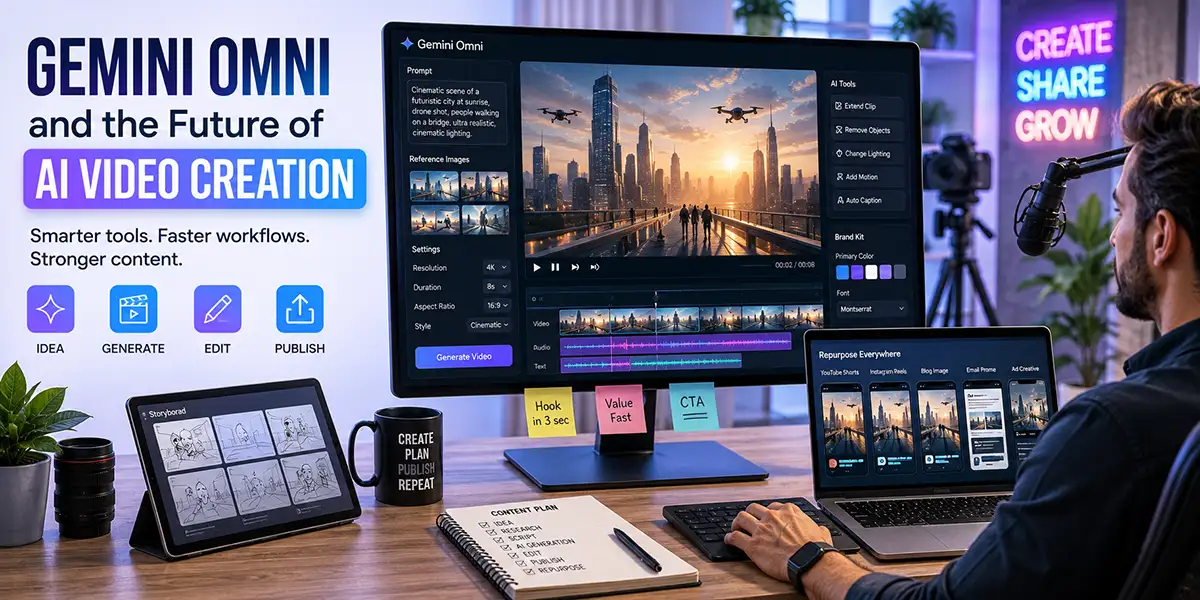
Gemini Omni and the Future of AI Video Creation for Creators
Google’s Gemini Omni points to a major shift in how creators, marketers, brands, and small businesses will make video content. AI video creation is no longer just about typing a prompt and hoping the output looks impressive. It is becoming a full creative workflow that can combine text, images, audio, video, prompts, editing instructions, brand direction, and platform-specific publishing.
For creators, this is important because video remains one of the most powerful content formats online. It also remains one of the hardest to produce consistently. A strong video usually requires planning, scripting, visuals, editing, sound, formatting, captions, thumbnails, publishing, and repurposing. That process can be slow and expensive, especially for solo creators and small teams.
AI video creation tools are changing that process. They are making it possible to move faster from idea to finished asset. But the real opportunity is not simply making more videos. The real opportunity is building a smarter content system where AI helps with production while the creator still controls the story, strategy, taste, and message.
That is where tools like Gemini Omni become important. They show where the creative industry is heading: toward multimodal AI systems that can understand and generate across different types of media. Instead of treating video as a separate technical task, AI tools are beginning to connect writing, images, audio, editing, and publishing into one creative workflow.
The big question for creators is no longer, “Can AI make video?”
The better question is, “How do I use AI video creation without losing originality, trust, and brand identity?”
Why Gemini Omni Matters for AI Video Creation
Gemini Omni matters because it represents the next stage of AI video creation. Early AI video tools were mostly focused on simple prompt-to-video generation. You would type a description, wait for the result, and then decide whether the clip was usable. That was exciting, but it was also limited.
The new generation of AI video tools is moving beyond that. The focus is now on multimodal creation. That means an AI system can work with different types of input at the same time. A creator may be able to use a written prompt, a reference image, a short video clip, an audio idea, a style direction, and editing instructions as part of one creative process.
This matters because real creative work is rarely based on one sentence. When a designer, editor, or creative director develops a piece of content, they usually think about mood, pacing, audience, format, brand identity, message, camera movement, color, typography, music, and emotional impact.
Multimodal AI video creation brings more of those creative signals into the production process. Instead of asking the AI to guess everything from a basic prompt, creators can provide more context. That creates a better chance of producing video that feels intentional rather than random.
For brands, this is especially important. A brand does not just need video. It needs video that feels like the brand. It needs the right tone, the right message, the right visual style, and the right call to action. AI can help create assets faster, but the brand still needs a clear creative system.
AI Video Creation Is Moving Into Everyday Creator Workflows
One of the biggest changes happening now is that AI video tools are moving closer to the platforms where creators already work. Instead of only living inside separate experimental tools, AI features are increasingly being added to social platforms, editing apps, content tools, and creative suites.
This is a major shift. When AI video creation becomes part of tools like YouTube Shorts, creator studios, editing software, and social publishing platforms, it becomes easier for more people to use it every day.
That means the amount of video content online is likely to grow even faster. More creators will be able to produce more clips, more edits, more remixes, more ads, more explainers, more visual experiments, and more platform-specific versions of the same idea.
For creators, this creates both an opportunity and a challenge.
The opportunity is speed. AI can help reduce production friction. It can help you test ideas, create visual drafts, build short clips, generate B-roll, experiment with scenes, and repurpose content faster than before.
The challenge is competition. If everyone can create video faster, then simply publishing more content will not be enough. The internet will become even more crowded with AI-assisted video. The creators who stand out will be the ones who use AI with stronger direction.
In other words, AI video creation will reward creators who know what they are trying to say.
The Creator Advantage: Taste, Strategy, and Story
As AI video tools become more powerful, the technical barrier to creating content gets lower. That is good news for independent creators, small businesses, educators, coaches, consultants, agencies, and media brands. It means more people can create professional-looking content without needing a large production team.
But this also means that technical production will become less of a competitive advantage. If everyone has access to powerful AI tools, the difference will come from something else.
The real advantage will be taste, strategy, and story.
Taste is the ability to know what looks good, what feels right, what matches your brand, and what should be removed. Strategy is the ability to connect a video to a larger goal. Story is the ability to make people care.
AI can generate visuals, but it does not automatically understand your audience. It does not automatically know your positioning, your offer, your values, your personal style, or your long-term brand direction. Those things still come from the creator.
This is why AI video creation should not be treated as a magic button. It should be treated as a creative assistant. The creator remains the director.
A generic AI video may look impressive for a few seconds, but a strategic video communicates a clear idea. It holds attention. It connects with the right audience. It supports a brand. It moves people toward a specific action.
That is the difference between content and communication.
How AI Video Creation Changes the Production Process
Traditional video production usually starts with an idea and moves through several stages: scripting, planning, shooting, editing, publishing, and promotion. Each stage takes time. Each stage also creates friction.
AI video creation changes the process by making it easier to move between concept and execution. A creator can test a visual idea before scheduling a shoot. A marketer can turn a blog post into a video script. A business owner can create product explainers without starting from scratch. A social media manager can create multiple variations of the same campaign for different platforms.
This does not eliminate the need for human editing. In fact, it makes human editing more important. AI can produce options quickly, but someone still needs to choose what works.
The creator’s job shifts from doing every technical task manually to directing the system. That includes writing better prompts, choosing better references, reviewing outputs, editing the final version, and making sure the video supports the larger content strategy.
This is a better way to think about the future of content creation. AI is not only a tool for generating assets. It is a tool for accelerating decisions.
How Brands Can Use AI Video Without Looking Generic
For brands, AI video creation can be extremely useful. It can help create ads, social clips, product explainers, internal training videos, educational content, campaign variations, and short-form promotional assets.
But there is a real risk: generic AI content.
When many people use the same tools, styles, prompts, and visual presets, the content can start to look the same. This has already happened with AI images. Certain lighting styles, overly polished faces, unrealistic environments, and predictable compositions became easy to recognize.
The same thing can happen with AI video. Brands that rely too heavily on default outputs may produce content that looks technically impressive but has no personality.
To avoid this, brands need a clear creative framework before they start generating video. They should define their message, audience, tone, color palette, visual style, pacing, editing preferences, and call to action. AI should then be used to support that framework.
The goal is not to make content that looks like AI. The goal is to make content that looks and feels like the brand.
A strong brand workflow may include a brand prompt library, visual reference boards, approved style examples, caption templates, intro and outro rules, thumbnail guidelines, and platform-specific publishing formats.
This gives AI more direction and gives the brand more control.
A Practical AI Video Creation Workflow for Creators
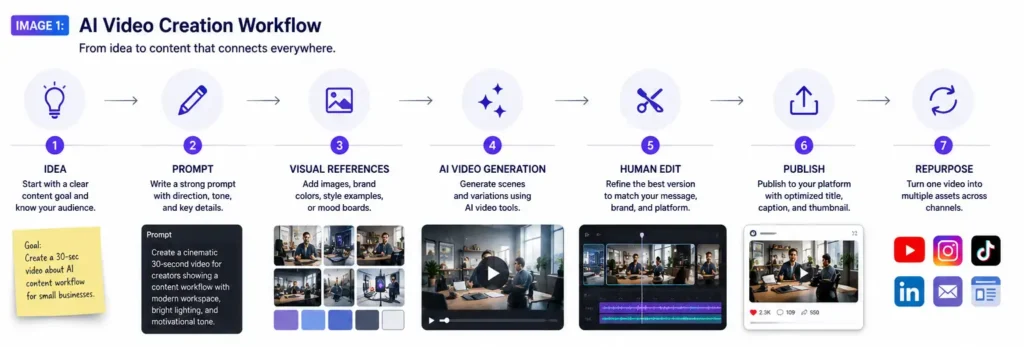
The best way to use AI video creation is to build a repeatable workflow. This helps you avoid random content and create a system that supports your brand, audience, and publishing goals.
1. Start With the Content Goal
Before opening any AI tool, define the goal of the video. Are you trying to educate, entertain, promote, inspire, explain, or sell?
A video designed to build awareness will be different from a product demo. A YouTube Short will be different from a LinkedIn thought leadership video. A brand story will be different from a paid ad.
The clearer the goal, the better the creative direction.
For example, instead of using a vague prompt like “make a video about AI marketing,” use a more specific direction:
Create a 30-second vertical video that explains how small businesses can use AI to turn one blog post into multiple social media clips.
That gives the AI more useful context and gives you a clearer way to judge the result.
2. Build the Hook First
Short-form video depends heavily on the first few seconds. If the hook is weak, people scroll away. If the hook is strong, they are more likely to stay.
Before generating visuals, write the hook. The hook tells the audience why they should care. It also tells the AI what kind of energy the video needs.
Strong hook examples include:
- Most creators are using AI video the wrong way.
- One blog post can become seven pieces of content.
- AI video is not replacing creators. It is changing the production process.
- The future of content creation belongs to creators who know how to direct AI.
A good hook gives the video a clear starting point.
3. Use Visual References
AI video tools become more useful when you provide references. Instead of relying only on text, use images, sample frames, brand visuals, mood boards, product shots, or examples of previous content.
Visual references help the AI understand the style you want. They can also help reduce random results.
For a creator or business, visual references may include logo files, brand colors, studio images, preferred lighting styles, camera angles, typography examples, and social media layouts.
This is where AI video creation becomes more professional. You are no longer just asking the AI to invent everything. You are giving it creative direction.
4. Generate Variations, Not Final Answers
One of the best ways to use AI video tools is to generate variations. Do not expect the first output to be perfect. Use AI to explore options quickly.
You can test different openings, backgrounds, visual styles, pacing, formats, and calls to action. Then you can choose the strongest version and refine it.
This is similar to how professional creative teams work. They do not rely on one idea. They create options, compare them, improve the strongest direction, and cut what does not work.
AI makes that process faster.
5. Human Edit the Final Cut
Even when AI generates strong clips, human editing is still essential. The final version needs to be reviewed for pacing, clarity, captions, brand consistency, factual accuracy, sound, formatting, and call to action.
This is especially important for business content. A video can look great and still fail if the message is unclear. It can have impressive visuals and still feel off-brand. It can move quickly but still lack purpose.
The human editor is the quality filter.
Creators should treat AI output as a draft, not the final product. The final product should still pass through human judgment.
6. Repurpose the Video Into Multiple Assets
The real power of AI video creation is not just making one video faster. The real power is building a content system.
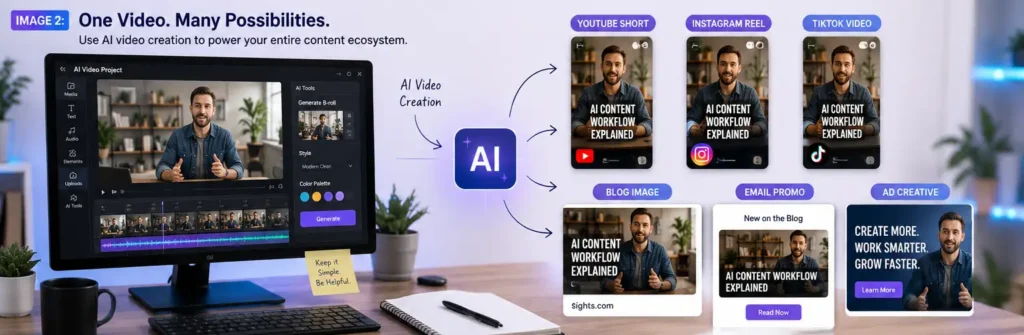
One AI-assisted video can become a YouTube Short, Instagram Reel, TikTok post, LinkedIn video, blog embed, email promo, paid ad variation, thumbnail, quote graphic, carousel post, and newsletter feature.
This is where creators and small businesses can gain leverage. Instead of creating one piece of content at a time, you can build campaigns around a single core idea.
AI helps speed up production. A smart content system helps make that production useful.
AI Video Tools Will Reward Better Creative Systems
As AI video creation becomes more common, creators will need better systems. Random prompting will not be enough. Posting more content will not be enough. The creators who win will build repeatable workflows that turn ideas into assets with consistency and purpose.
A strong AI video system may include idea capture, prompt templates, brand voice rules, visual references, content calendars, editing checklists, publishing formats, and performance reviews.
This kind of system helps creators avoid the biggest problem with AI content: producing a lot of material that does not connect to anything.
AI gives you speed. Systems give you consistency. Strategy gives you value.
That combination is where the future of creative work is heading.
What Creators Should Watch Next
Gemini Omni is part of a larger movement toward AI-powered creative environments. The long-term direction is clear: writing, design, video, audio, editing, publishing, and analytics are becoming more connected through AI.
Creators should watch how these tools integrate into the platforms they already use. Built-in AI features inside social platforms and editing tools will change how quickly content is produced and how audiences experience it.
Creators should also pay attention to transparency. As AI-generated and AI-edited content becomes more common, audiences will care about trust, authenticity, and source clarity. Watermarks, labels, attribution, and remix controls may become more important parts of the content ecosystem.
Most importantly, creators should watch audience response. AI-generated content may become normal, but audiences will still reward content that feels useful, entertaining, personal, educational, or emotionally real.
The tools are changing quickly. Human attention is still earned the old-fashioned way: by giving people something worth watching.
Final Takeaway: AI Makes Video Faster, Strategy Makes It Valuable
Gemini Omni points to a future where AI video creation becomes part of everyday content production. For creators, this is a major opportunity. For brands, it is also a warning.
The opportunity is faster production, more creative testing, easier repurposing, and lower barriers to professional-looking video. The warning is that speed alone will not create trust, attention, or brand value.
The creators who win will not simply generate the most content. They will use AI with taste, strategy, and purpose.
AI can help make the video.
But the creator still needs to make it matter.
FAQ: Gemini Omni and AI Video Creation
What is Gemini Omni?
Gemini Omni is part of Google’s next generation of multimodal AI development, focused on helping AI systems work across different types of media such as text, images, audio, and video. For creators, the important idea is that AI video tools are becoming more connected, flexible, and useful inside real creative workflows.
How can creators use AI video creation tools?
Creators can use AI video creation tools to develop concepts, generate visual drafts, test different styles, create short-form clips, produce B-roll, speed up editing, and repurpose content across platforms like YouTube, Instagram, TikTok, LinkedIn, and blogs.
Will AI video tools replace creators?
AI video tools will automate parts of production, but they will not replace the need for creative direction. Creators still provide strategy, taste, storytelling, audience understanding, brand identity, and final judgment.
Why does AI video creation matter for brands?
AI video creation matters for brands because it can make content production faster and more affordable. However, brands need clear creative systems to avoid generic AI content and maintain a recognizable identity.
What is the best way to start using AI video creation?
The best way to start is with a clear workflow. Define your goal, write the hook, gather visual references, generate several variations, human-edit the best version, and repurpose the finished video into multiple content formats.