
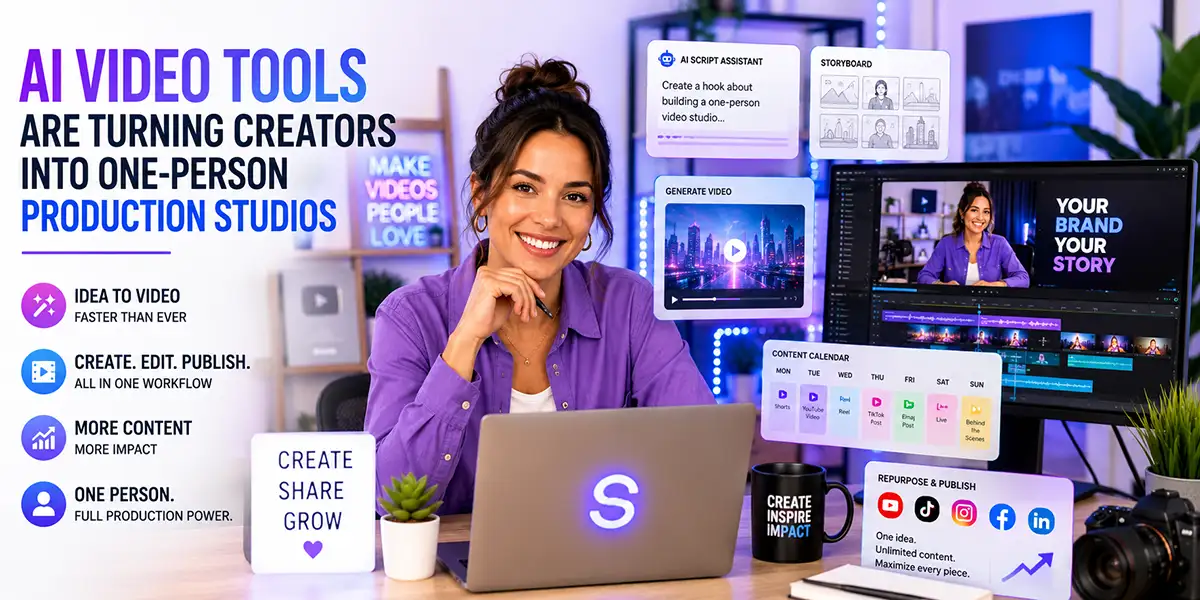
AI Video Tools Are Turning Creators Into One-Person Production Studios
AI video tools are changing what it means to be a creator.
A few years ago, producing professional-looking video content usually required a full team. You needed someone to write the script, shoot the footage, edit the video, design the graphics, create captions, make thumbnails, and repurpose everything for social media.
Today, that workflow is changing fast.
AI video tools are making it easier for creators, marketers, educators, and small brands to produce more video content with fewer resources. The result is a new kind of creator workflow: one person can now operate more like a small production studio.
This does not mean AI replaces creativity. It means creative people now have more production power. The real advantage belongs to creators who can guide the tools, shape the story, protect the brand, and turn one idea into many useful assets.
Why AI Video Tools Are Getting So Much Attention
The rise of AI video is no longer just about experimental clips. We are now seeing AI-assisted storytelling, short-form production, creator workflows, mobile editing, and automated video systems moving into the mainstream.
The Guardian recently reported on Gossip Goblin, an AI filmmaking project that has gained major attention with surreal sci-fi shorts and a small creative team. The story matters because it shows how AI-assisted video production can help small teams create work that gets large-scale attention.
At the same time, creator tools are becoming more mobile-first. Android Central recently reported that Google is adding creator-focused Android features, including screen-and-camera recording, improved social media integrations, AI editing tools, and better support for video creators.
Even advertising workflows are changing. A recent research paper on AI-assisted advertisement video editing describes how unified video, audio, and text workflows could reduce production cost and iteration time while improving consistency and control.
Put these shifts together and the direction becomes clear: video production is becoming faster, more flexible, and more accessible.
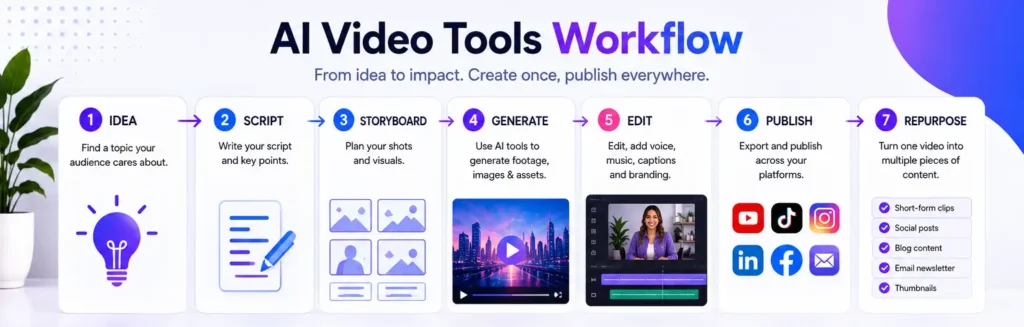
The One-Person Production Studio Is Becoming Real
The phrase “one-person production studio” does not mean one creator does everything manually.
It means one creator can now direct a workflow that used to require several specialists.
With the right system, one creator can use AI to help with:
- Researching video ideas
- Writing scripts and hooks
- Creating storyboard concepts
- Generating visual directions
- Planning B-roll
- Editing rough cuts
- Creating captions
- Designing thumbnails
- Writing YouTube descriptions
- Repurposing long videos into short clips
- Turning video ideas into social posts and emails
This is a major shift for creators and small businesses. Instead of waiting for a larger budget, larger team, or perfect production setup, they can start building repeatable video systems now.
AI Video Tools Lower the Barrier to Production
Traditional video production can be intimidating. You need equipment, lighting, editing skills, sound, footage, music, graphics, and time.
AI video tools lower some of those barriers by helping creators move faster through the early and middle stages of production.
For example, a creator can start with a simple idea like “how to use AI to plan better social media content.” From there, AI can help generate a video outline, short-form script, visual concept, thumbnail direction, caption ideas, and repurposing plan.
That does not mean the creator should publish the first AI output. The best results still require human editing, judgment, and taste. But the blank-page problem becomes much easier to overcome.
Short-Form Video Is Accelerating the Shift
Short-form video has changed the production rhythm for almost every creator.
Audiences now expect frequent video content across YouTube Shorts, Instagram Reels, TikTok, Facebook, LinkedIn, and other platforms. This creates pressure to produce more clips, more hooks, more captions, and more variations.
AI video tools help creators keep up by supporting repeatable formats.
A single idea can become:
- A 60-second educational short
- A 15-second hook video
- A product demo clip
- A behind-the-scenes post
- A YouTube Short
- An Instagram Reel
- A LinkedIn video post
- A TikTok tip
The advantage is not simply that AI can help make more content. The advantage is that it can help creators build a system where every idea gets used more effectively.
AI Can Generate the Footage, But Creators Still Direct the Vision
The biggest mistake people make with AI video is thinking the tool is the strategy.
It is not.
AI can help generate footage, scripts, captions, thumbnails, and ideas. But it does not automatically know your audience, your brand, your point of view, your offer, or your standards.
That is where human direction matters.
Creators still need to decide:
- What story is worth telling
- What the audience needs to understand
- What tone fits the brand
- What visual style feels right
- What should be edited out
- What call to action makes sense
- What should never be automated
This is why the strongest creators will not be the ones who generate the most videos. They will be the ones who give AI better direction.
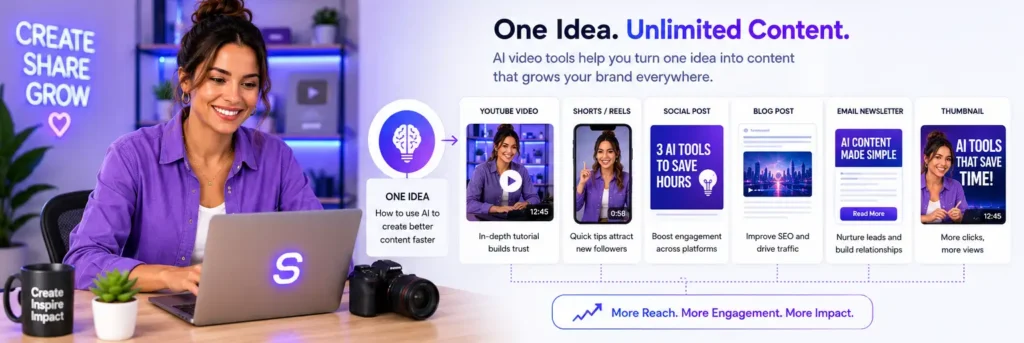
What a One-Person AI Video Studio Looks Like
A one-person AI video studio does not need to be complicated.
It can start with a simple workflow:
1. Idea and research
Start with a topic your audience cares about. Use AI to explore angles, questions, common mistakes, and search-friendly titles.
2. Script and outline
Use AI to create a rough script, then edit it in your own voice. Keep the message clear and focused on one useful idea.
3. Visual direction
Define the visual style before generating anything. Choose the mood, colors, scene type, brand look, and platform format.
4. Production
Create the video using a mix of your own footage, screen recordings, AI-generated visuals, product screenshots, voiceover, captions, and simple edits.
5. Publishing
Publish the main video with a clear title, description, thumbnail, and CTA. Make sure the video leads somewhere useful, such as a blog article, product page, free kit, or email signup.
6. Repurposing
Turn the strongest moments into short clips, captions, social posts, newsletters, blog updates, and product CTAs.
Why This Matters for Small Brands
Small brands often face a visibility problem. They need content to build trust, but they do not always have a large team or production budget.
AI video tools can help small brands create more consistent content around their products, services, values, and expertise.
A small brand can use AI-assisted video workflows to create:
- Product explainers
- Founder-led videos
- Customer education clips
- FAQ videos
- Behind-the-scenes stories
- Short-form ads
- Training content
- Newsletter video summaries
- Social media campaigns
This gives small brands a way to act more like media companies without needing to hire a full media department.
The Real Skill Is Workflow Design
As AI video tools improve, the most valuable skill may not be prompting alone.
The real skill is workflow design.
Creators need systems for:
- Capturing ideas
- Choosing topics
- Writing scripts
- Generating visual directions
- Editing for clarity
- Publishing consistently
- Repurposing across platforms
- Tracking what works
This is where AI becomes powerful. It helps the creator move faster through a system that already has direction.
Without a system, AI can create more noise. With a system, AI can help create momentum.
Useful Tools for a One-Person Production Studio
You do not need every creative tool available. You need a simple stack that helps you move from idea to published content.
For AI visuals, thumbnails, storyboard ideas, and video concept images, OpenArt.ai can help creators quickly explore visual directions before producing videos, ads, or social content.
For creators who want to turn video content into lessons, workshops, or digital products, LearnWorlds can support structured online learning experiences and course-based content.
For creators managing tools, affiliate dashboards, client accounts, and publishing platforms while traveling or working from shared networks, NordVPN can add an extra layer of privacy and safer browsing.
What Creators Should Do Next
If you want to start building a one-person production studio, do not begin by collecting every AI tool.
Start by building one repeatable workflow.
Use this simple plan:
- Choose one topic your audience cares about.
- Write a simple outline.
- Create one main video.
- Use AI to support visuals, scripts, captions, and repurposing.
- Turn the video into three short clips.
- Turn the idea into a social post and newsletter section.
- Track what performs.
- Improve the next video.
This keeps the process manageable. You are not trying to become a full media company overnight. You are building one system at a time.
Final Thoughts
AI video tools are turning creators into one-person production studios because they reduce the friction between idea and output.
But the tools are only part of the story.
The real advantage belongs to creators who understand audience, brand, message, workflow, and creative direction.
AI can help create the footage. AI can help organize the workflow. AI can help repurpose the content.
But the creator still directs the vision.
That is the future of creator-led video production: faster tools, smarter systems, and more human creative direction.
Want to Build Your Own AI Video Content System?
The AI Video Marketing Kit for Creators gives you prompts, scripts, planners, affiliate video templates, course promo workflows, and repurposing tools to turn your ideas into useful video content faster.
Affiliate Disclosure: Some links in this article are affiliate links. If you purchase through them, Sights.com may earn a commission at no additional cost to you. We only recommend tools and resources that fit the topic and may be useful for creators, marketers, and small businesses.