
AI Video Creation Workflow Is Evolving Into a Complete Creator System
AI video creation is moving into a new phase. The first wave of AI video tools was mostly about generating short clips from text prompts. That was exciting, but it was also limited. Creators could describe a scene, generate a few seconds of video, and experiment with visual ideas that would have been difficult or expensive to film.
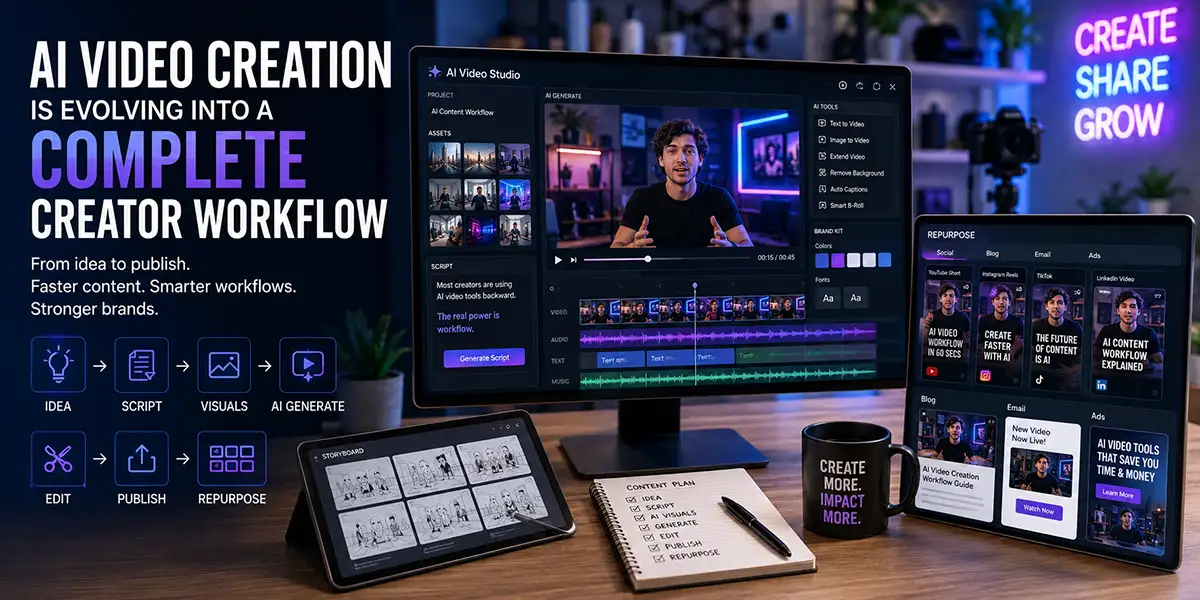
Now the conversation is changing. AI video is no longer just about making a clip. It is becoming part of a complete creator workflow that includes idea development, scripting, visual references, video generation, editing, repurposing, publishing, and brand consistency.
This matters for creators, marketers, agencies, small businesses, and media brands because video is still one of the most powerful formats online. It is also one of the most demanding. Producing consistent video content usually requires planning, filming, editing, captions, thumbnails, platform formatting, and promotion.
AI tools are starting to reduce that friction. Instead of treating video production as one large project, creators can now break the process into smaller, faster steps. The result is a new kind of production system where AI helps move ideas through the pipeline faster, while humans still guide the message, taste, strategy, and final edit.
The future of AI video creation is not just a better generator. It is a creative operating system.
From AI Video Generator to AI Video Creation Workflow
The early version of AI video creation was simple: write a prompt, generate a clip, review the result, and try again. That process was useful for experimentation, but it did not solve the full problem creators face every day.
Creators do not just need random video clips. They need content that fits a message, supports a brand, speaks to an audience, and works on specific platforms. A video for YouTube Shorts has different needs than a LinkedIn thought leadership video. A product demo has different needs than a cinematic brand teaser. A paid ad has different needs than an educational tutorial.
This is why AI video creation is evolving into a workflow. The real value is not only in generating visuals. The value is in helping creators move from idea to finished content faster and with more control.
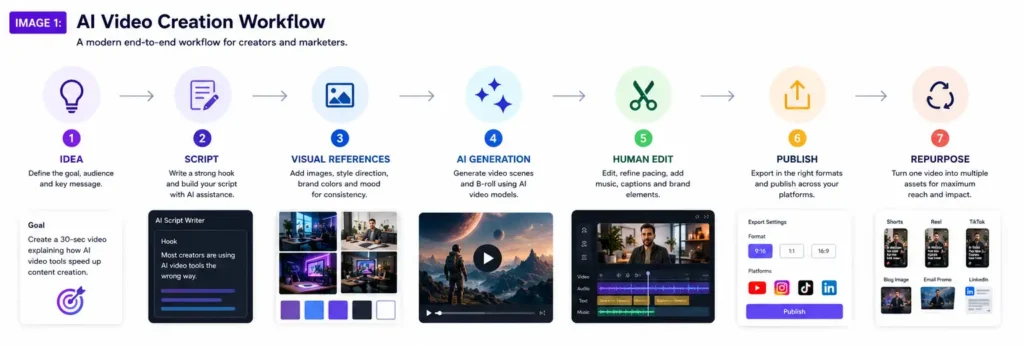
A modern AI video creation workflow can include:
- Brainstorming video ideas
- Writing hooks and scripts
- Creating storyboards
- Generating visual references
- Producing AI-generated scenes
- Editing clips with natural language
- Adding captions and brand elements
- Repurposing one video into multiple formats
- Publishing across social platforms
- Reviewing performance and improving the next video
This shift is important because creators are not looking for more tools just for the sake of having more tools. They need systems that help them create better content with less friction.
Why AI Video Tools Are Becoming Full Creative Systems
The reason AI video tools are becoming full creative systems is simple: video production has many steps. A single generator only solves one part of the problem.
A creator may start with a blog post, podcast episode, product announcement, customer question, or social media trend. That idea then needs to become a script, a visual direction, a video format, a caption, a thumbnail, and a call to action. After publishing, the same idea may need to become a YouTube Short, Instagram Reel, TikTok post, LinkedIn clip, email promo, and website embed.
This is where AI becomes more useful. It can help connect the pieces.
Instead of opening one app for writing, another for visuals, another for editing, another for captions, and another for repurposing, creators are moving toward integrated workflows. These workflows may still use multiple tools, but the process becomes more organized and repeatable.
That is the big change. AI is not just making video creation faster. It is changing how creators think about production.
Gemini Omni Shows Where AI Video Creation Is Heading
Google’s Gemini Omni is a strong example of where AI video creation is heading. Google describes Gemini Omni as a model that can combine text, images, audio, and video as inputs to generate video. It also supports conversational editing, which means users can make changes through natural language rather than relying only on traditional editing controls.
That kind of workflow is important because it gives creators more ways to direct the output. A creator may begin with an idea, add a reference image, include a rough video clip, describe the mood, and then edit the result through conversation.
This is different from basic prompt-to-video generation. It moves closer to how real creative direction works. Instead of asking AI to guess everything from one sentence, the creator provides context, references, edits, and feedback.
For creators and brands, this means AI video tools are becoming less like novelty generators and more like production assistants. They can support concept development, iteration, visual testing, and revision.
The biggest opportunity is not that AI can generate a video. The bigger opportunity is that AI can help creators move through the entire creative process faster.
Source: Google: Introducing Gemini Omni
Runway, Adobe Firefly, and the Rise of AI Production Platforms
Gemini Omni is not the only signal. Other major AI creative platforms are also moving toward broader production workflows.
Runway has become one of the most recognized names in generative video, offering AI video models and creative tools designed for visual production. Adobe Firefly is also expanding beyond images into video, audio, design, and creative generation inside a larger ecosystem familiar to designers, editors, and marketers.
This matters because creators do not want isolated experiments forever. They want tools that fit into their real work. A designer wants AI to connect with design assets. A video editor wants AI to fit into editing and post-production. A marketer wants AI to help create campaigns, social clips, ads, and content variations.
The winning tools will likely be the ones that understand the whole workflow, not just the generation moment.
For small teams, this is especially powerful. A creator or business owner can now do work that previously required a larger production crew. AI can help with B-roll, short-form clips, product visuals, explainers, storyboards, rough edits, and content variations.
That does not mean every creator suddenly becomes a filmmaker. It means more creators can build a video content system that is practical, repeatable, and affordable.
Sources: Runway AI video platform and Adobe Firefly AI video generator
The New AI Video Creation Workflow
A strong AI video creation workflow should not begin with the tool. It should begin with the goal.
Before generating a video, creators should know what the content is supposed to do. Is it meant to educate, entertain, promote, inspire, explain, or sell? Is it designed for YouTube, TikTok, Instagram, LinkedIn, a website, or an email campaign?
Once the goal is clear, the workflow becomes much stronger.
1. Start With the Idea
Every good video starts with a clear idea. AI can help brainstorm, but the creator still needs to choose an idea that fits the audience and the brand.
For example, a vague idea like “make a video about AI marketing” is too broad. A stronger idea would be “show how one blog post can become five short-form videos using an AI content workflow.”
Specific ideas produce better videos.
2. Write the Hook and Script
The hook is critical, especially for short-form video. AI can help write multiple hook options, but the creator should choose the one that feels most relevant and memorable.
A strong hook might be:
Most creators are using AI video tools backward. The real power is not generation. It is workflow.
Once the hook is set, the script should move quickly. Short videos need clarity. Longer videos need structure. In both cases, the script should guide the visual direction.
3. Add Visual Direction
Visual direction is where many AI videos fail. A simple prompt may produce something interesting, but not necessarily something useful.
Creators should include visual references, brand colors, lighting direction, camera style, mood, environment, and platform format. This gives the AI more context and helps reduce generic results.
Instead of writing “futuristic office,” a stronger direction would be:
A bright modern creator studio with white walls, blue and purple accent lighting, a clean desk, multiple screens showing a video editing timeline, and a professional but approachable brand style.
That gives the AI a much better creative target.
4. Generate Drafts and Variations
AI video creation should be treated as a drafting process. The first output does not need to be final. In fact, it usually should not be final.
The best approach is to generate multiple variations. Test different openings, camera styles, backgrounds, pacing, and endings. Then choose the strongest direction and refine it.
This is how professional creative teams already work. They explore options before committing to the final version. AI simply makes that exploration faster.
5. Human Edit the Final Version
AI can generate, but humans still need to edit. The final version should be reviewed for pacing, accuracy, captions, sound, visual consistency, brand fit, and call to action.
This step is where creators protect quality. AI may produce impressive visuals, but a creator decides whether the video actually communicates the right message.
Human editing also helps avoid content that feels generic, confusing, or disconnected from the brand.
6. Repurpose the Content
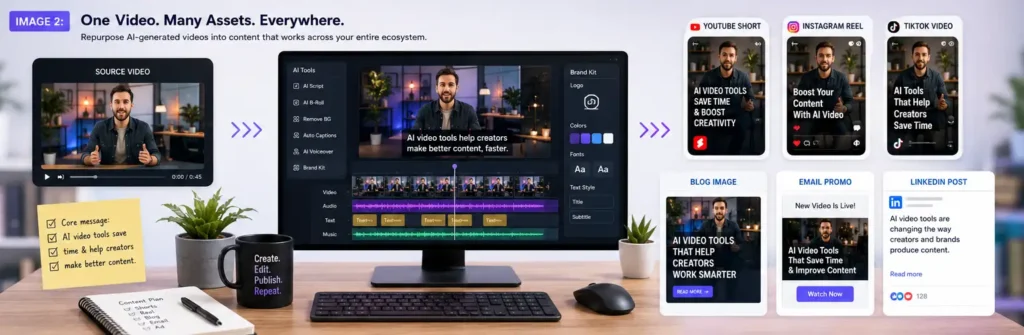
The biggest advantage of an AI video creation workflow is repurposing. One video idea can become several pieces of content.
A single AI-assisted video can become:
- A YouTube Short
- An Instagram Reel
- A TikTok video
- A LinkedIn clip
- A blog embed
- An email promo
- A paid ad variation
- A thumbnail concept
- A carousel post
This is where AI becomes more than a creative toy. It becomes part of a content engine.
Why Human Creative Direction Still Matters
As AI video creation tools become more powerful, it may seem like the tool is doing all the work. But that is not really what is happening.
The tool can generate options. The creator still provides judgment.
Human creative direction matters because audiences do not respond only to polished visuals. They respond to relevance, emotion, clarity, personality, usefulness, and trust.
AI can help make a video look better. It cannot automatically make the message meaningful. It does not automatically understand your audience, your positioning, your values, your offer, or your long-term brand strategy.
That is why creators should think of AI as a production partner, not a replacement for creative thinking.
The creators who win will not be the ones who generate the most content. They will be the ones who use AI to create clearer, more useful, more consistent, and more memorable content.
What This Means for Brands and Marketers
For brands and marketers, AI video creation creates a major opportunity. It allows teams to test more ideas, produce content faster, and create more variations for different platforms.
But there is also a risk. If brands rely too much on default AI outputs, their content may start to look like everyone else’s. Generic AI content may be fast, but it does not build trust or recognition.
Brands should build AI video workflows around their own identity. That means using brand voice, visual guidelines, approved messaging, audience insights, and consistent creative direction.
A strong brand AI workflow should include:
- A brand prompt library
- Approved visual references
- Platform-specific templates
- Caption and thumbnail guidelines
- Editing checklists
- Content repurposing rules
- Human review before publishing
This helps AI support the brand instead of watering it down.
The Future: AI as a Creative Operating System
The future of AI video creation is not just about generating more clips. It is about connecting the full creative process.
Creators will use AI to brainstorm ideas, shape scripts, create visuals, test edits, generate clips, repurpose content, and improve publishing workflows. Small teams will be able to operate with the speed and flexibility of larger production teams.
This does not remove the need for creators. It changes the creator’s role. The creator becomes more like a director, strategist, editor, and brand architect.
AI handles more of the production friction. The creator handles the meaning.
That is the real shift. AI video is evolving from a tool that makes clips into a system that helps creators build media.
Final Takeaway
AI video creation is entering a more practical and powerful stage. The focus is moving beyond simple text-to-video generation and toward complete creator workflows.
Tools like Gemini Omni, Runway, Adobe Firefly, and other AI platforms point toward a future where creators can move faster from idea to finished content. But speed alone is not enough.
The real advantage will belong to creators and brands that combine AI tools with strategy, taste, storytelling, and consistent systems.
AI can help you make more video.
A strong workflow helps you make better video.
And strong creative direction makes that video worth watching.
FAQ: AI Video Creation Workflow
What is an AI video creation workflow?
An AI video creation workflow is a repeatable process that uses AI tools to help with idea generation, scripting, visuals, video generation, editing, publishing, and repurposing. It is more complete than simply using a text-to-video generator.
Why are AI video tools becoming more important for creators?
AI video tools are becoming important because they reduce production friction. They help creators test ideas faster, create visual drafts, generate short clips, edit more efficiently, and repurpose content across platforms.
Will AI video tools replace video editors?
AI video tools may automate parts of the editing process, but human editors are still needed for pacing, judgment, storytelling, brand consistency, accuracy, and final polish.
How can brands avoid generic AI video content?
Brands can avoid generic AI video content by using clear brand guidelines, visual references, approved messaging, prompt libraries, editing checklists, and human review before publishing.
What is the best way to start using AI video creation?
The best way to start is to build a simple workflow: choose a content goal, write a strong hook, create a short script, define the visual style, generate variations, edit the best version, and repurpose it for multiple platforms.